
As a beginner who is currently learning Web Development, many people think that JavaScript is asynchronous by default. But let me tell you something clearly — JavaScript is NOT asynchronous by default.
JavaScript is synchronous in nature. It becomes capable of handling asynchronous operations by using concepts like the JavaScript Engine, Runtime Environment, Web APIs, Event Loop, Macro Task Queue, and Micro Task Queue. With the help of these components, JavaScript can handle asynchronous behavior through Callbacks, Promises, and Async/Await.
O… O… O… 🤯
What the hell are all these terms?
And how do they even matter for JavaScript to handle asynchronous operations?
Relax. For now, let’s ignore Callbacks, Promises, and Async/Await. In this article, we will primarily focus on the core building blocks behind asynchronous JavaScript:
- JavaScript Engine
- JavaScript Runtime
- Web APIs
- Event Loop
- Micro Task Queue
- Macro Task Queue
Don’t get intimidated by hearing these terms. They are not as hard as they sound. I’ll make sure you deeply understand each and every component, step by step.
So that by the end of this article, you won’t just understand asynchronous JavaScript for yourself —
👉 you’ll be confident enough to explain it clearly to others.
Table of Contents
What Does “Synchronous” Mean in JavaScript?
Synchronous means:
JavaScript executes code line by line, one statement at a time, in the exact order it appears.
Example:
console.log("A");
console.log("B");
console.log("C");
Output:
A
B
C
Each line in the above code waits for the previous line to finish. And by any chance one of the line got stuck for some reason. Let’s say there is a issue on line 2 then, code below that line won’t get executed until the issue is resolved. This is what Synchronous Code means.
Why Is JavaScript Synchronous by Default?
The core reason is:
👉 JavaScript is single-threaded
This means:
- JavaScript has only one call stack ( discussed later in this article )
- It can do only one task at a time
- No true parallel execution like Java or C++
Why was JavaScript designed this way?
JavaScript was originally created to:
- Run in the browser
- Handle user interactions (clicks, typing, form validation)
- Safely manipulate the DOM
Imagine if JavaScript were multi-threaded:
- Two threads modifying the DOM at the same time
- Race conditions
- Unpredictable UI bugs
💡 Single-threaded = simple + safe
Browsers make JavaScript Asynchronous
Yes, BROWSERS! 🚀
They give JavaScript the power to run and execute asynchronous code.Whether it’s Google Chrome, Firefox, Safari, or Opera, every browser comes with its own JavaScript engine, and this is what makes asynchronous execution possible in JavaScript.
⏱️Wait! What is JavaScript Engine?
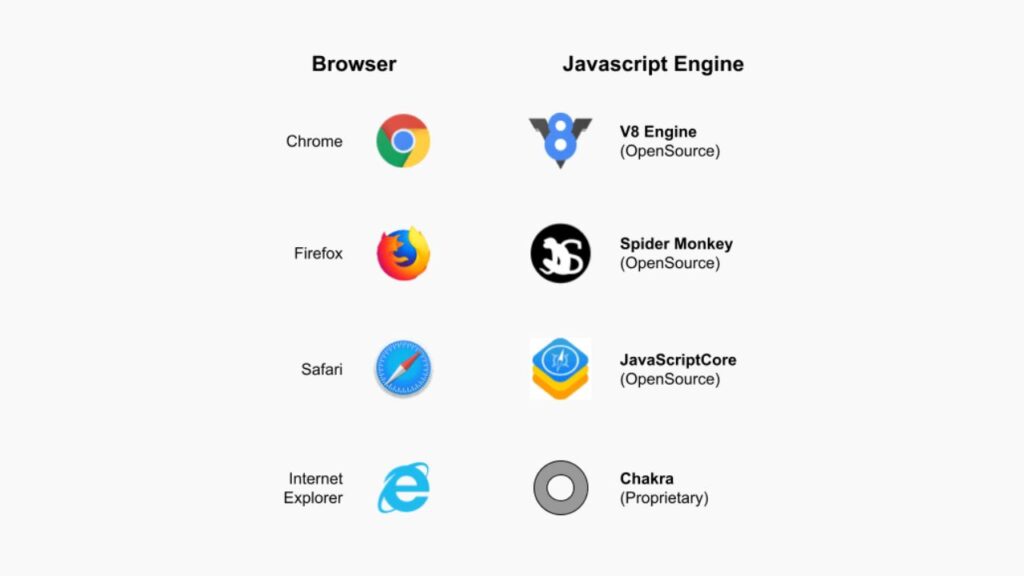
A JavaScript Engine is nothing but a piece of software that every browser has, and each browser comes with its own JavaScript engine. For example, Google Chrome uses the V8 JavaScript engine.
A JavaScript engine consists of the core components that we discussed earlier in this article.
- CallStack
- Web API’s
- Event Loop
- Micro Task Queue
- Macro Task Queue
Let’s take an example and dive deep into what each component does.
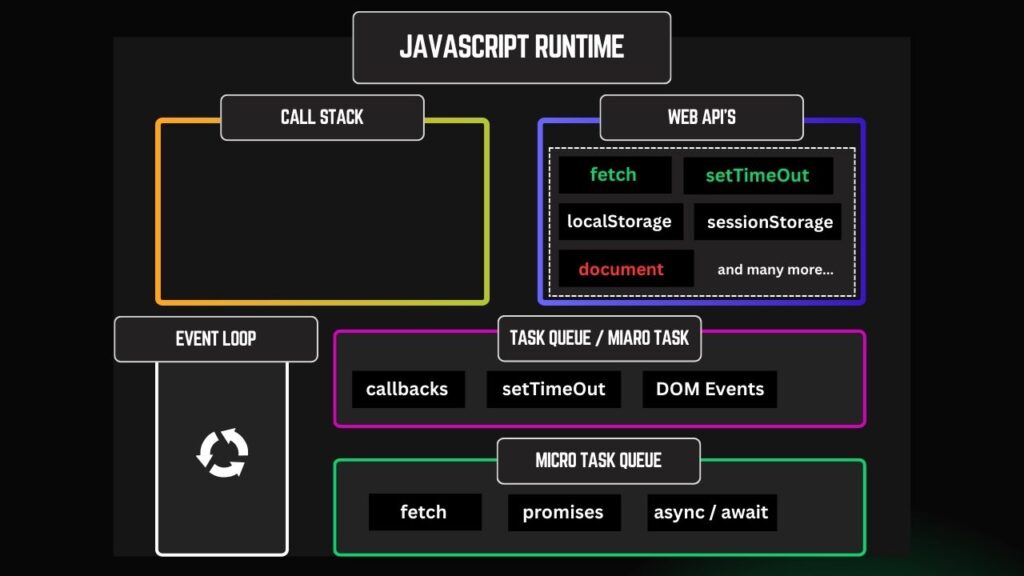
As you can see in the image above, these are the components that a JavaScript Engine is made up of.
The JavaScript Runtime is simply the environment where our JavaScript code runs inside the browser, and it exists within the JavaScript engine.
Let us consider an example code:
console.log("One");

setTimeout(() => {
  console.log("Two");
}, 2000);

console.log("Three");
Output:
One
Three
Two
If you look at the code above, based on what we know, JavaScript is synchronous and reads code from top to bottom. This means we should get the output as One, Two, and then Three, because that’s the exact order in which we wrote the code.
But if you observe the actual output, it’s different from what we expected: One, Three, and then Two.
Why does this happen? 🤔
This is exactly what asynchronous behavior in JavaScript looks like.
But… how does this happen?
setTimeout is Asynchronous in nature
If you look at our code, you’ll notice a setTimeout function. This function is provided by the Web APIs in the JavaScript runtime.
👉 Remember this: setTimeout is not a part of JavaScript itself. It is provided by the Web API (refer to the image above).
In the code, we’ve set a delay of 2000 milliseconds, which means 2 seconds. This tells JavaScript to continue executing the remaining code while the timer runs in the background.
That’s the reason we get the output as One, Three, and then Two after 2 seconds have elapsed.
If this still feels confusing, don’t worry — that’s completely normal.
Let’s visualize this step by step to understand exactly what’s happening behind the scenes.
What Actually Happens When JavaScript Runs This Code
Step – 1
This is how JavaScript Runtime looks initially with the code we have got. Note, that our code did not run yet.
console.log("One");

setTimeout(() => {
  console.log("Two");
}, 2000);

console.log("Three");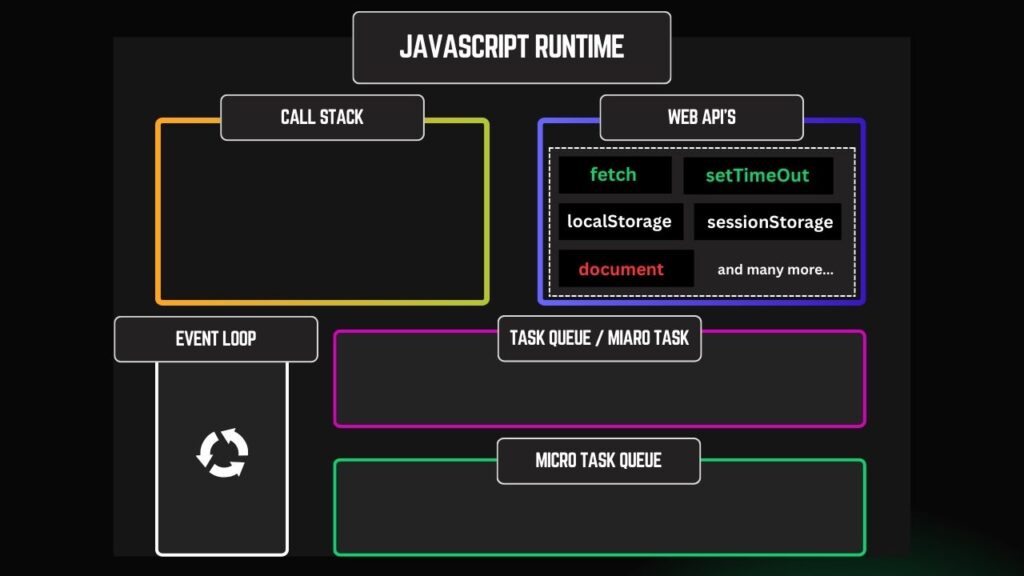
Step – 2
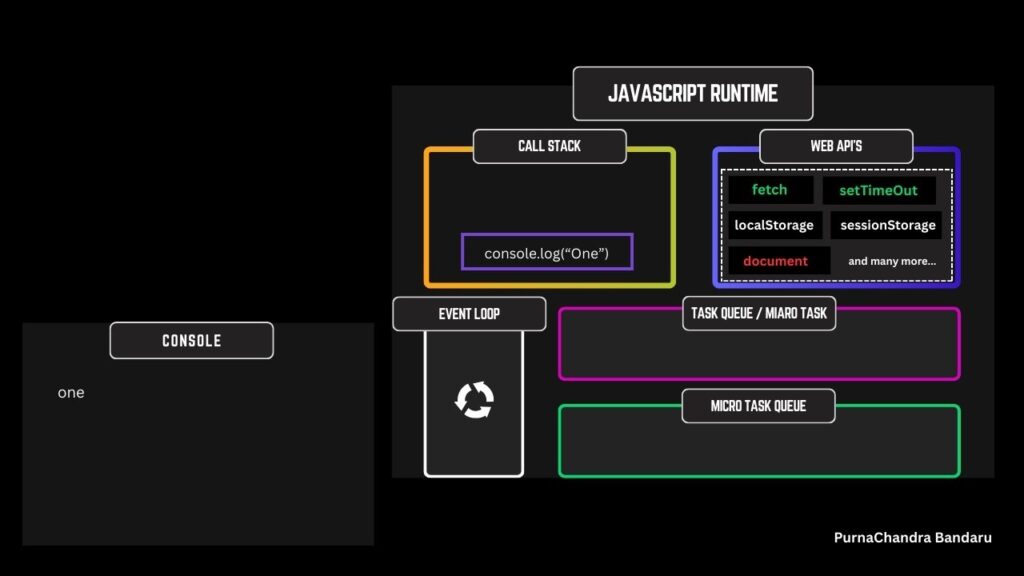
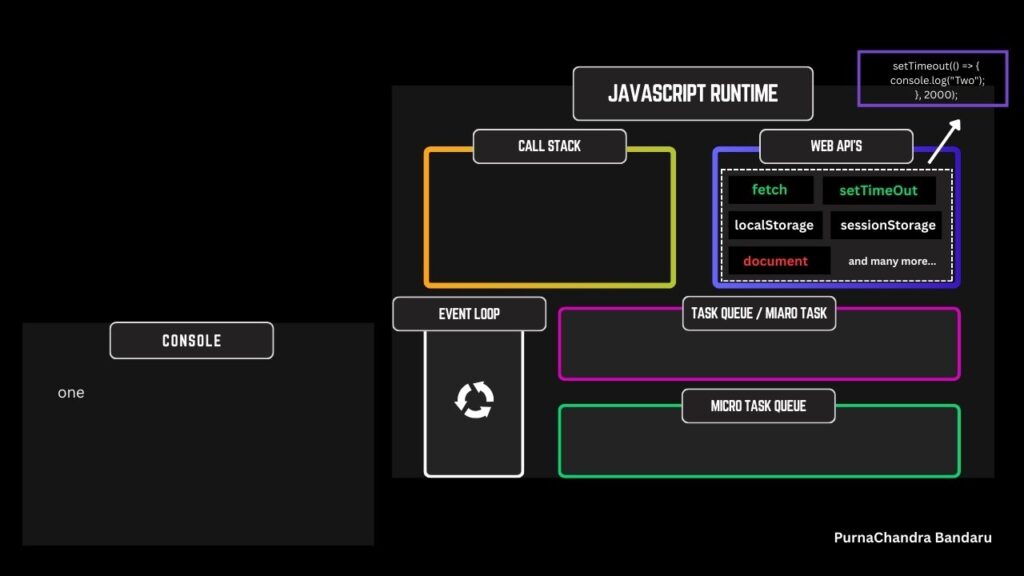
console.log("One");JavaScript see first line
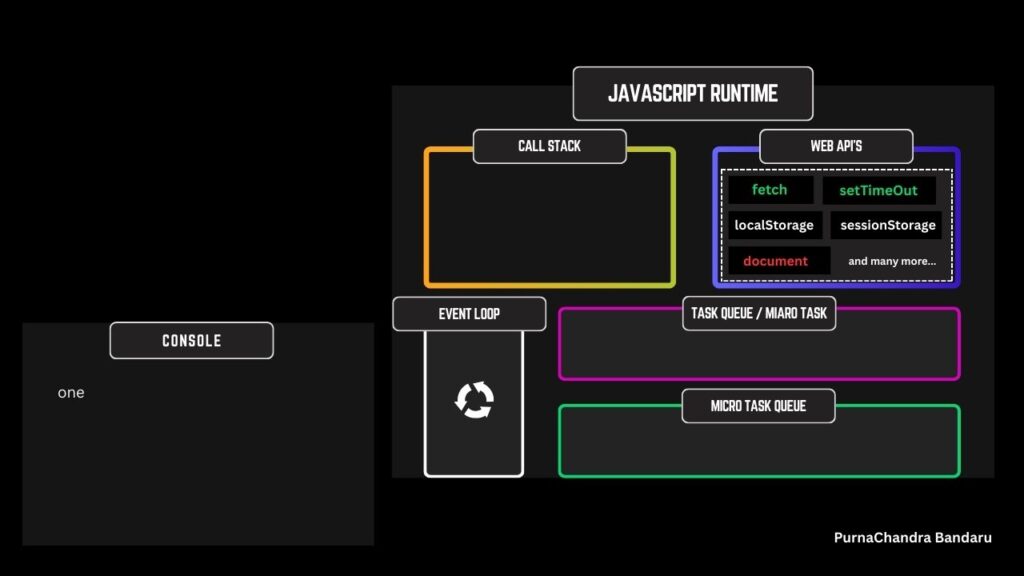
Puts that code block into CallStack logs the result and then removes that code block from CallStack. This is important because, JavaScript is Synchronous in nature. CallStack needs to be empty so it can run other code. (refer images below)
Step – 3
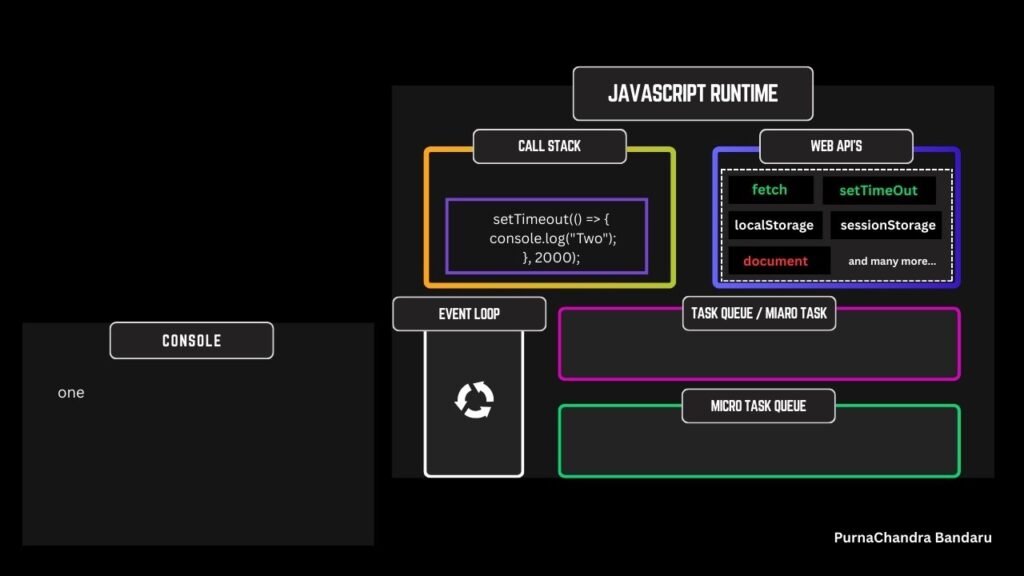
setTimeout(() => {
  console.log("Two");
}, 2000);
JavaScript see second line
JavaScript see setTimeout function and puts it in CallStack first, then from there it pushes to Web API setTimeout area and wait there till 2 seconds has elapsed. So, now CallStack is empty and JavaScript can look for remaining code. (if any)
Step – 4
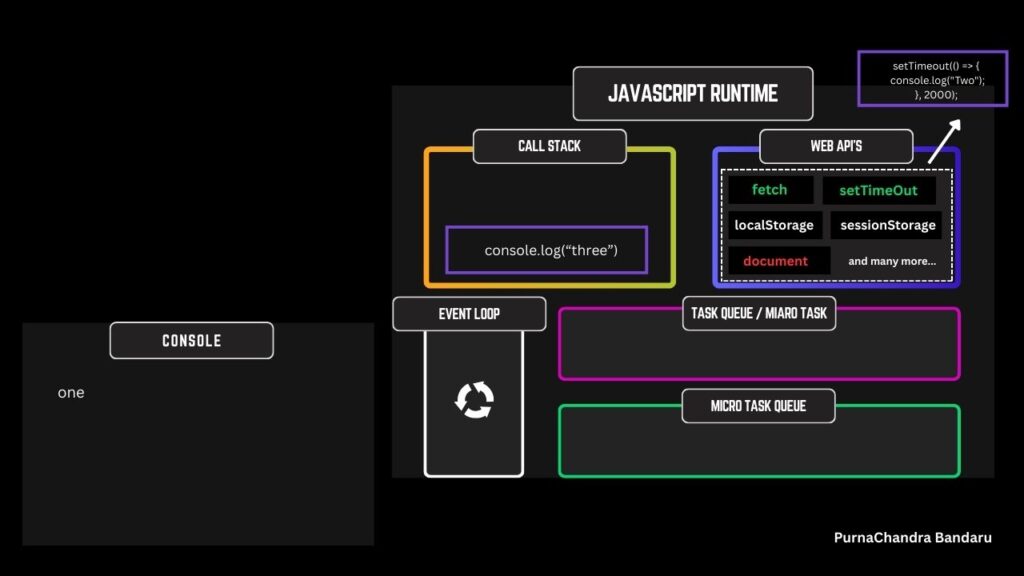
console.log("Three");JavaScript now see final line
As, CallStack is now empty JavaScript pushes code to it. As, code has no timer set gets executed immediately logs result to the console and gets removed from CallStack making it empty again.
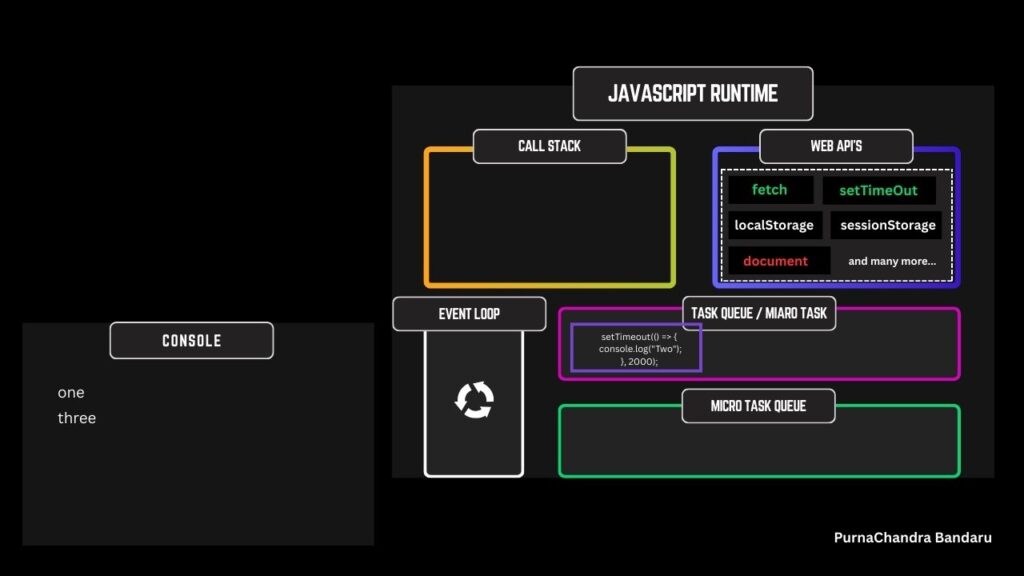
If you closely look at image 2 above, as 2 seconds might have elapsed the code got pushed to Task Queue. Why, Task Queue? Callbacks, setTimeouts, DOM events get pushed there once time has elapsed as they have least priority.
And you guessed it right. Micro Task Queue has the high priority and they accept Promises, Async/Await, fetch and more…. (we will see them in future)
Step – 5
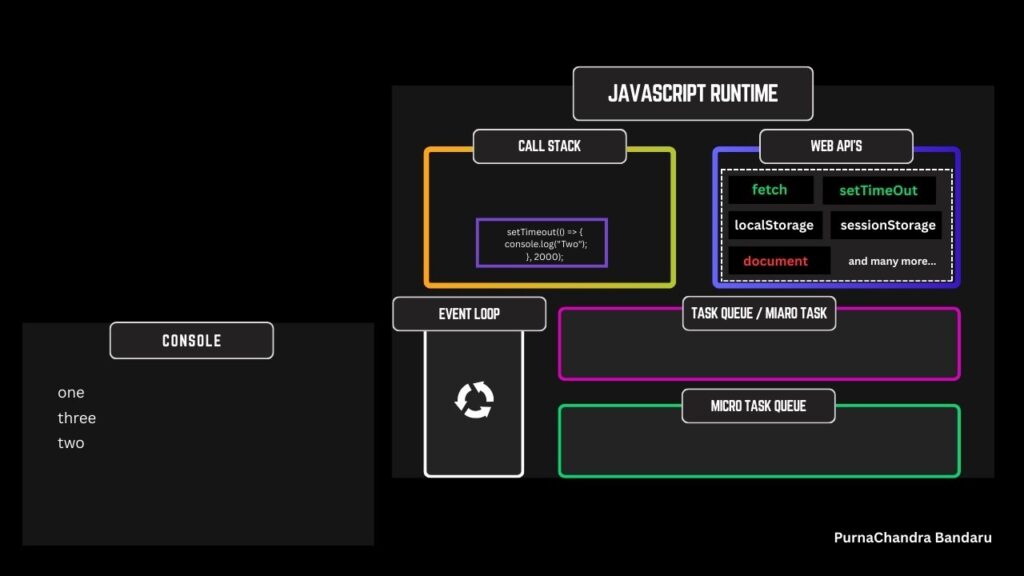
Now, our CallStack is empty currently. Task Queue has code waiting to be pushed to CallStack. But How? Who does that?
It’s the Event Loop responsibility to constantly check for CallStack Status. As it’s now empty Event Loop pushes code from Task Queue to the CallStack. Code gets executed, logs the result and then code gets removed from the CallStack. This is how JavaScript works Asynchronously though it’s Synchronous and Single Threaded by Default.
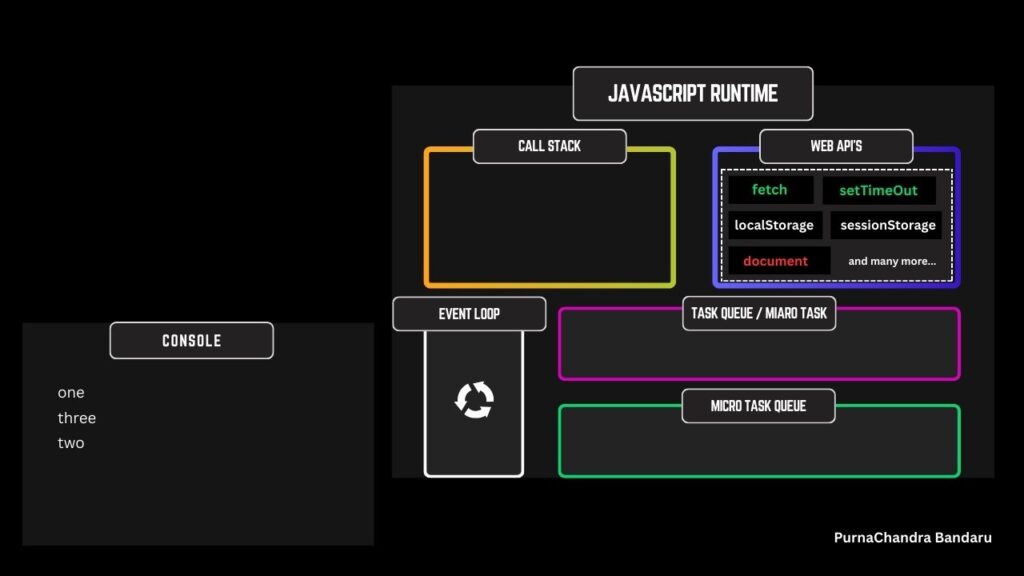
Event Loop (Heart of Async JavaScript)
The Event Loop continuously checks:
“Is the Call Stack empty?”
If yes:
- Take tasks from queues
- Push them into the Call Stack
But, we have two queues. If both queues have code waiting, which gets first pushed to the CallStack?
When the Call Stack becomes empty, the Event Loop does NOT pick tasks randomly.
👉 There is a strict priority order.
🥇 Highest Priority → Microtask Queue
🥈 Lower Priority → Macrotask (Callback) Queue
Mental Model To Easily Remember
1️⃣ Execute all Microtasks
2️⃣ Then execute one Macrotask
3️⃣ After that, check Microtasks again
4️⃣ Repeat the cycle
Final Thoughts
JavaScript being synchronous by default is not a limitation — it is a design choice that makes the language predictable, safe, and efficient. By running on a single thread with a single call stack, JavaScript avoids complex concurrency problems and keeps applications stable, especially in the browser.
Asynchronous behavior does not break this model. Instead, JavaScript relies on the runtime environment, the Event Loop, and task queues to handle time-consuming operations without blocking the main thread. Features like callbacks, promises, and async/await are simply developer-friendly abstractions built on top of this mechanism.
Once you truly understand:
- the Call Stack
- the Event Loop
- Microtask and Macrotask queues
you stop memorizing syntax and start reasoning about JavaScript execution.
This understanding is what separates someone who writes JavaScript from someone who understands JavaScript.
Whether you’re preparing for interviews, debugging real-world issues, or building scalable applications, mastering synchronous and asynchronous JavaScript is a non-negotiable skill — and now you have the foundation to do exactly that.
“I hope I’ve kept my promise. You now don’t just understand how synchronous and asynchronous JavaScript works — you’re in a position to confidently explain it to others as well.” – (PurnaChandra Bandaru)
You can also check out the video version of this topic on my YouTube channel, explained in Telugu.
Do check out my blog regularly for more articles, and feel free to pin the site for quick and easy access.
Thank you for reading this article and being part of the learning journey.
— Episteme by Purna (PurnaChandra Bandaru)”