
Imagine a dad asking his son to give a callback once college is done, so he can come and pick him up. So what does callback mean here? As soon as the son finishes college, he will give a callback to his dad to let him know that the college is done for the day, right?
In programming also, the same concept exists. Consider that you have two functions (func1 and func2). One function (func2) can ask another function (func1) to give a callback, so it can be called back later in time.
I know I lost you here. Let me explain this with code. So, the two functions would be —
function func1() {
  console.log("I am function 1");
};

function func2() {
  console.log("I am function 2");
};

// Calling here
func1();
func2();
They are still normal javascript functions. We have not implemented any callback yet. So, if we call both the functions in the same order they are defined. The output we get will also be in the same order.
Table of Contents
Output –
I am function 1
I am function 2
Now, let’s implement a callback. So, What is a Callback? As, i said before we have two functions (func1 and func2). One function (func2) can ask another function (func1) to give a callback, so it can be called back later in time.
In JavaScript way we can say it as –
A Callback is nothing but, a function passed as an argument to another function so, it can be executed later.
So, a function (func2) passed as an argument to another function (func1) so, it can be called later. Let’s do this, we will pass func2 as an argument to func1 so, func1 will be responsible to call func2.
Callback Implementation
function func1(callback) {
  console.log("I am function 1");
  callback();
};

function func2() {
  console.log("I am function 2");
};

// Calling here
func1(func2);
Callback implemented
So, if you observe the code we wrote at the beginning versus the code we have written now. There would be just a couple of changes. We declared both the functions (func1 and func2) just as normal. But if you see while calling func1 i have passed another function (func2) as an argument.
Since, we are passing it we have to accept it as well. And i did that while declaring func1. I accepted it with a name callback. Again, you can name it whatever you want to. After accepting, i have called the callback i.e. func2. So, if you see the output it is same as before.
I am function 1
I am function 2
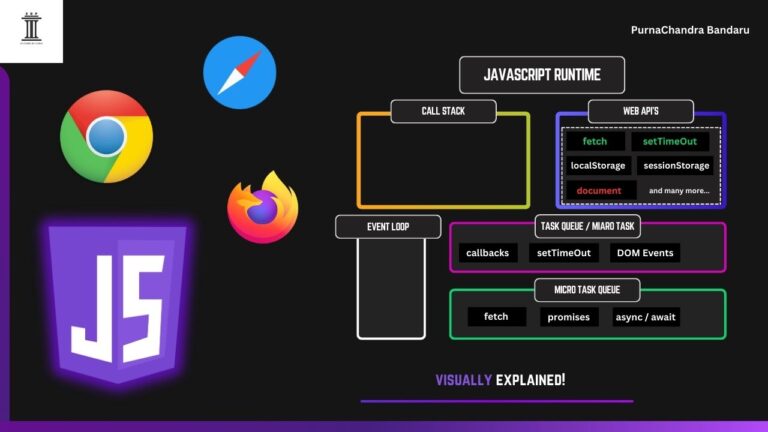
But, Why? Because if you look at it closely. The code is Synchronous in nature means the code gets executed line by line and there is no involvement with Web API’s, Event Loop and Macro/Micro Task Queue. Hence, it is Synchronous in nature. If you don’t know What Synchronous and Asynchronous mean? You can read it here. I have explained How JavaScript Works Internally when we run a code. Understanding that will make you understand this concept better moving forward. So, do have a read.
Let’s decode Our Callback
This is the code we have written –
function func1(callback) {
  console.log("I am function 1");
  callback();
};

function func2() {
  console.log("I am function 2");
};

// Calling here
func1(func2);
JavaScript see the first function (func1) declaration and store it in memory. And same goes for func2 as well. Then, we have called func1 by passing func2 as a parameter. Closely observe and remember we did call it like this – func1(func2) not like this – func1(func2()). If we have called the wrong way, func2 would have executed immediately. Then, there is no point of Callbacks. We do want func1 to get executed first then after that it should execute the callback. In this case func2.
So, we did call func1(func2). Since, we are calling func1 javascript goes inside that function body see the first line and logs it then it calls the callback means func2. So, now the control goes inside func2 and logs the result. That is the reason why the output is like func1 log first then func2 log.
So, now we understood Callback specifically Synchronous Callback like how to implement it and how it works. Let’s now understand and implement Callback in Asynchronous way with an example.
Scenario – Movie Ticket Booking App
Let’s take a Movie Ticket Booking App as an example to understand the concept and implement Asynchronous Callback. We all know how to book a Movie Ticket online right? It involves multiple steps. For simplicity let us take 4 steps –
- Selecting a Movie
- Selecting a Seat
- Making Payment
- Getting Booking Status
Let’s now code this in Synchronous way first. Then, i will explain why Asynchronous code suits best here. As we have 4 steps we need 4 functions. Let’s define them all and call them one by one.
function selectMovie() {
  console.log("Movie Selected");
};

function selectSeat() {
  console.log("Seat Selected");
};

function makePayment() {
  console.log("Payment Done ✅");
};

function orderStatus() {
  console.log("Booking Confirmed!");
};


// calling them one by one
selectMovie();
selectSeat();
makePayment();
orderStatus();
This is Synchronous Code. Why? Because code runs line by line starting from top to bottom and there is no involvement of Web API’s, Event Loop and Micro/Macro Task Queues here. The output we get is as follows –
Movie Selected
Seat Selected
Payment Done ✅
Booking Confirmed!
You might ask me a question: everything is running fine and working as expected, right? Then why do I need to implement this asynchronously?
Let me ask you a question instead. Would you use an app that freezes completely when a request you made takes some time to finish and return the result? I know you didn’t get this yet. Let me explain with an example.
Take the same movie ticket booking example. Let’s say you open the app and it takes some time to load the first page. But without even showing you the first page, the app freezes completely and takes you back to the home screen. You open the app again, and the same thing happens. After a few tries, you finally see the first page — the movies list.
Now you select a movie and click Next. The app again takes some time to load the next page, which is the seat chart page. But the app freezes again and throws you back to the home screen. Now you have to start everything all over again.
Would you use this app?
If your answer is NO, then this is exactly the problem with the above code. It is synchronous, which means it is blocking in nature.
Think realistically. Do you think that every time you click the Next button, the app loads the page instantly? No, right? It always takes some time — at least a few milliseconds.
This is the reason why we need to make it asynchronous.
And now, without wasting any time, let’s do that.
Making Movie Ticket Booking App Asynchronous
We have to implement below code Asynchronously.
function selectMovie() {
  console.log("Movie Selected");
};

function selectSeat() {
  console.log("Seat Selected");
};

function makePayment() {
  console.log("Payment Done ✅");
};

function orderStatus() {
  console.log("Booking Confirmed!");
};


// calling them one by one
selectMovie();
selectSeat();
makePayment();
orderStatus();
Now we know that every step takes some time — let’s say 2 seconds. We can use the setTimeout function here to introduce that delay, right? So, let’s do that.
Using setTimeout instantly turns our code asynchronous, because it is part of the Web APIs.
function selectMovie() {
  setTimeout(() => {
    console.log("Movie Selected");
  }, 2000);
}

function selectSeat() {
  setTimeout(() => {
    console.log("Seat Selected");
  }, 2000);
}

function makePayment() {
  setTimeout(() => {
    console.log("✅ Payment Done!");
  }, 2000);
}

function orderStatus() {
  setTimeout(() => {
    console.log("🎟️ Ticket Booked!");
  }, 2000);
}

// function calling
selectMovie();
So, now we have put every log statement in setTimeout function in every function. Does this alone solve our problem? No, because if you see the code i have called selectMovie() down below. What it does is it calls the function. JavaScript goes to that function and put that into the Callstack -> then see the setTimeout put that in Web API. Then, the code wait there for 2 seconds then move on to the Macro Task Queue -> from there Event Loop puts that log statement into the Callstack and logs the statement and pops of that log statement from Callstack.
That’s the flow right. What if i have called the remaining functions the same way one by one.
selectMovie();
selectSeat();
makePayment();
orderStatus();
Output –
Movie Selected (2 seconds)
Seat Selected  (2 seconds)
Payment Done ✅  (2 seconds)
Booking Confirmed!  (2 seconds)
The output makes us feel like everything is perfect. But, there is a big problem here. According to our code all the pages like Movies page -> Seat Chart Page -> Payment Page -> Order Status Page every page will get displayed after 2 seconds each. But, that’s not we want. We don’t want user to go to Payment Page without selecting a movie and Seat right? This is where we make use of Callbacks.
function selectMovie(callback) {
  console.log("Movie Selected");

  setTimeout(() => {
    callback();
  }, 2000);
}

function selectSeat(callback) {
  console.log("Seat Selected");

  setTimeout(() => {
    callback();
  }, 2000);
}

function makePayment(callback) {
  console.log("✅ Payment Done!");

  setTimeout(() => {
    callback();
  }, 2000);
}

function orderStatus() {
  console.log("🎟️ Ticket Booked!");
}

selectMovie(() => {
  selectSeat(() => {
    makePayment(() => {
      orderStatus();
    });
  });
});
If you see the code above, I have initially called selectMovie() function by passing selectSeat function as a Callback. But, why did i pass selectSeat as () => {selectSeat()}. Because i don’t want it to be executed immediately. I want movieSelect function to execute it right after it completes it’s own execution. So, if you see movieSelect function i have accepted a callback which is selectSeat function and it get’s executed after the log after 2 seconds has elapsed.
Same goes for all the remaining functions. While calling selectSeat function i have passed makePayment function as an argument and accepted the same in selectSeat function as a parameter. Same for makePayment. But, for orderStatus function i haven’t passed any callback as it is the last step. This way we made sure the each step is dependent on one another. In other words, user can go to Payment Page only after Movies Page and Seat Chart Page.
This is how we can implement Callbacks Asynchronously. But, there is a better of handling the same Asynchronous operations in modern JavasScript. That is by using Promises.
Why Promises? Callbacks are working fine right? Yeah, it works fine but it can become messy very quickly and harder to debug as the code grows. If you see the below pattern –
selectMovie(() => {
  selectSeat(() => {
    makePayment(() => {
      orderStatus();
    });
  });
});
The code is in the shape of right side tilted pyramid. In JavaScript it is called as Callback Hell. Which is a serious problem. Why? Because, see you work as a team in any company you work for. And if someone in your team wrote a callback like this which has 50 steps or more. It becomes quite difficult for others in the team to work on it. That is the reason why we have couple of alternatives to implement asynchronous code. They are Promises and Async/Await which we will see in future articles.
For now, I hope you understand Callbacks and how to implement them both Synchronously and Asynchronously.
You can also check out the video version of this topic on my YouTube channel, explained in Telugu.
Do check out my blog regularly for more articles, and feel free to pin the site for quick and easy access.
Thank you for reading this article and being part of the learning journey.
— Episteme by Purna (PurnaChandra Bandaru)”