
Before we talk about JavaScript events, let me ask you a simple question.
When you click a button on a website, how does JavaScript know that you clicked it?
Who told JavaScript that something just happened?
The answer is events.
But most beginners learn events like this:
button.addEventListener("click", () => {});
They memorize the syntax, but they don’t really understand:
- What an event actually is
- Who creates it
- Who listens to it
- How it flows inside the browser
So let’s slow down and understand this from first principles.
Table of Contents
Real-Life Analogy: Door Bell
Imagine this scenario.
You are inside your house.
Someone comes outside and presses the doorbell.
What happens?
- The doorbell rings (event happens)
- You hear the sound (listener)
- You open the door (response)
Now think carefully:
- The doorbell does not open the door by itself
- It only notifies you that something happened
👉 This is exactly how JavaScript events work.
What Is an Event in JavaScript?
In simple words:
An event is a signal that something happened.
Something like:
- User clicked a button
- User typed in an input
- Page finished loading
- Mouse moved
- Key was pressed
JavaScript does not constantly check what the user is doing.
Instead, the browser creates events and JavaScript reacts to them.
Who Creates Events?
This is important.
👉 JavaScript does NOT create most events.
The browser does.
The browser:
- Detects user actions
- Creates an event object
- Notifies JavaScript
JavaScript’s job is only to:
- Listen to events
- Decide what to do when they happen
First Example: Click Event
Let’s start with the most common example.
HTML
<button id="btn">Click Me</button>
JavaScript
const button = document.getElementById("btn");

button.addEventListener("click", () => {
  console.log("Button clicked");
});
Now let’s understand what is actually happening.
Breaking It Down Line by Line
const button = document.getElementById("btn");
- JavaScript finds the button element from the DOM
- Stores a reference to it
button.addEventListener("click", () => {
  console.log("Button clicked");
});
This line means:
“Hey browser, when a click event happens on this button, please call this function.”
Important point:
- The function is not executed immediately
- It is stored and executed later, when the event happens
This is why events are asynchronous by nature.
What Is an Event Listener?
An event listener is simply a function that waits for an event to occur.
Syntax:
element.addEventListener(eventType, callback);
eventType→ what you are listening for (click,input,submit)callback→ what should run when it happens
👉 This callback is executed only when the event occurs, not before.
Common JavaScript Events
Some very common events you’ll use:
Mouse Events
clickdblclickmouseentermouseleavemousemove
Keyboard Events
keydownkeyup
Form Events ( will discuss it in another article)
submitchangeinputfocusblur
Page Events ( will discuss it in another article)
loadDOMContentLoaded
Event Object (Very Important)
Whenever an event happens, JavaScript automatically provides an event object.
Example:
button.addEventListener("click", (event) => {
  console.log(event);
});
This event object contains:
- What type of event happened
- Which element triggered it
- Mouse position
- Key pressed (for keyboard events)
Example:
event.target
This tells you which element triggered the event.
Example: Input Event
<input type="text" id="name" />
const input = document.getElementById("name");

input.addEventListener("input", (event) => {
  console.log(event.target.value);
});
Here:
- Every time the user types
- Browser fires an
inputevent - JavaScript logs the current value
This is how real-time validation works.
Event Flow: Bubbling and Capturing
This is where most people get confused.
Let’s understand this slowly.
Scenario
<div id="parent">
  <button id="child">Click</button>
</div>
Both elements have click listeners.
parent.addEventListener("click", () => {
  console.log("Parent clicked");
});

child.addEventListener("click", () => {
  console.log("Child clicked");
});
Now click the button.
Output:
Child clicked
Parent clicked
Why?
Event Bubbling (Default Behavior)
By default, events bubble up.
Meaning:
- Event happens on the child
- Then moves to parent
- Then to grandparent
- Then to document
This is called event bubbling.
👉 Most JavaScript events use bubbling.
Event Capturing (Rare but Important)
Capturing is the opposite:
- Event starts from the top
- Moves down to the target
You can enable capturing like this:
parent.addEventListener("click", () => {
    console.log("Parent clicked");
  },
  true
);
The third argument true means capture phase.
Stopping Event Propagation
Sometimes, you don’t want bubbling.
child.addEventListener("click", (event) => {
  event.stopPropagation();
  console.log("Child clicked");
});
Now the event stops at the child.
Prevent Default Behavior
Some elements have default actions.
Example:
- Form submission ( will discuss it in another article)
- Anchor tag navigation
form.addEventListener("submit", (event) => {
  event.preventDefault();
  console.log("Form submitted");
});
This prevents page reload.
Event Delegation (Very Powerful)
Instead of adding event listeners to many children, we add one listener to the parent.
Why?
- Better performance
- Works for dynamic elements
Example:
ul.addEventListener("click", (event) => {
  if (event.target.tagName === "LI") {
    console.log(event.target.textContent);
  }
});
This uses:
- Bubbling
event.target
In the above code, we have added an Event Listener only to one parent (ul) and all the direct children of that parent (li) will now have access to the event. Event delegation is heavily used in real-world apps.
Common Beginner Mistakes
- Using
onclickinstead ofaddEventListener - Forgetting
preventDefault - Not understanding bubbling
- Adding too many listeners
- Removing elements without removing listeners
Mental Model to Remember
Browser creates events. JavaScript listens and reacts.
JavaScript does not control the browser.
It responds to what the browser tells it.
Once you understand this, events become simple.
What’s Next?
Now that you understand JavaScript events, the next step is:
How asynchronous JavaScript really works behind the scenes
That means:
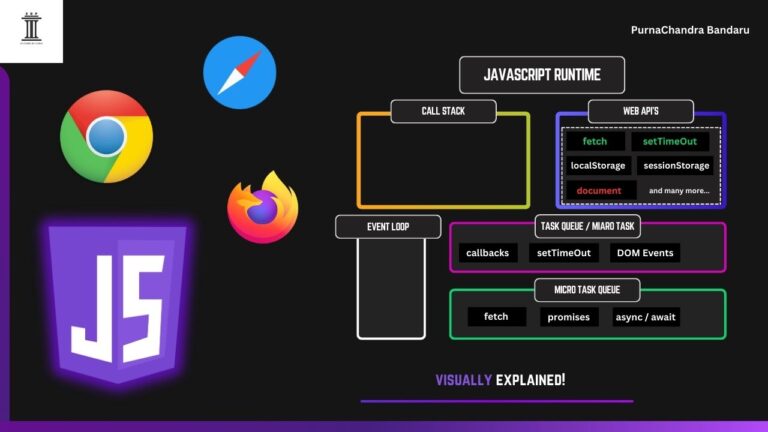
- Call stack
- Web APIs
- Event loop
And that’s where JavaScript truly becomes powerful. You can read it here.
Thank you for reading. Make sure you checkout my other articles as well.
— Episteme by Purna (PurnaChandra Bandaru)